


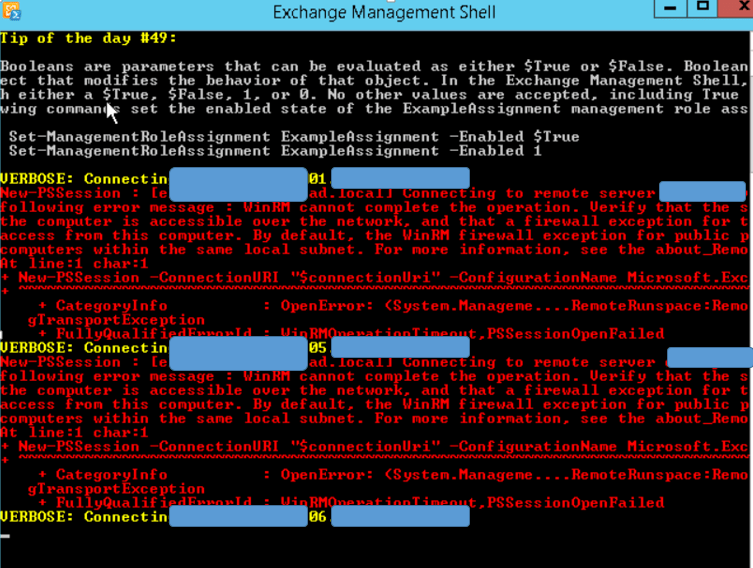
HI all this morning i cope with an error message on exchange 2013 powershell
VERBOSE: Connecting to AAABBBCCCS01.xx.bb.loc.
New-PSSession : [AAABBBCCCS01.xx.bb.loc] Connecting to remote server AAABBBCCCS01.xx.bb.loc failed with the
following error message : WinRM cannot complete the operation. Verify that the specified computer name is valid, that
the computer is accessible over the network, and that a firewall exception for the WinRM service is enabled and allows
access from this computer. By default, the WinRM firewall exception for public profiles limits access to remote
computers within the same local subnet. For more information, see the about_Remote_Troubleshooting Help topic.
At line:1 char:1
+ New-PSSession -ConnectionURI « $connectionUri » -ConfigurationName Microsoft.Excha …
+ ~~~~~~~~~~~~~~~~~~~~~~~~~~~~~~~~~~~~~~~~~~~~~~~~~~~~~~~~~~~~~~~~~~~~~~~~~~~~~~~~
+ CategoryInfo : OpenError: (System.Manageme….RemoteRunspace:RemoteRunspace) [New-PSSession], PSRemotin gTransportException
+ FullyQualifiedErrorId : WinRMOperationTimeout,PSSessionOpenFailed
The weird thing is that I’ve got 4 new other exchange servers installed with the same sources running on the same OS (Windows 2012 R2, exchange SP1) on vm made with the same template, on the same subnet without any issue.
After verification, i can ping all servers and the connection to Local domain controller is ok and on all exchange server the firewall is off for all connection public domain and private.
g Name: Application
Source: MSExchange ADAccess
Date: 8/7/2014 9:03:30 AM
Event ID: 2080
Task Category: Topology
Level: Information
Keywords: Classic
User: N/A
Computer: AAABBBCCCS01.xx.bb.loc
Description:
Process Microsoft.Exchange.Directory.TopologyService.exe (PID=2472). Exchange Active Directory Provider has discovered the following servers with the following characteristics:
(Server name | Roles | Enabled | Reachability | Synchronized | GC capable | PDC | SACL right | Critical Data | Netlogon | OS Version)
In-site:
AAABBB001.bb.loc CDG 1 7 7 1 0 1 1 7 1
AAABBBPDC005.bb.loc CDG 1 7 7 1 0 1 1 7 1
AAABBB002.ad.local CDG 1 7 7 1 0 1 1 7 1
AAABBBPDC006.bb.loc CDG 1 7 7 1 0 1 1 7 1
AAABBBPDC007.xx.bb.loc CDG 1 7 7 1 0 1 1 7 1
AAABBBPDC008.xx.bb.loc CDG 1 7 7 1 0 1 1 7 1
AAABBB003.xx.bb.loc CDG 1 7 7 1 0 0 1 7 1
AAABBBPDC009.xx.bb.loc CDG 1 7 7 1 0 1 1 7 1
AAABBB004.xx.bb.loc CDG 1 7 7 1 0 0 1 7 1
Out-of-site:
XXXrtd001-dc.xx.bb.loc CDG 1 7 7 1 0 0 1 7 1
XXXMOS002.xx.bb.loc CDG 1 7 7 1 0 1 1 7 1
XXXmos001.xx.bb.loc CDG 1 7 7 1 0 1 1 7 1
On another Exchange Server where I don’t have the issue the value of this event is correct. So the problem should not be linked to a GC Access.
After verifications Winrm seams to works well:
C:\Users\TERUIL-EXT>WinRM QuickConfig
WinRM service is already running on this machine.
WinRM is already set up for remote management on this computer.
After looking on the system log I found multiple events like this
log Name: System
Source: Microsoft-Windows-Security-Kerberos
Date: 8/6/2014 8:31:46 PM
Event ID: 7
Task Category: None
Level: Error
Keywords: Classic
User: N/A
Computer: AAABBBCCCS01.xx.bb.loc
Description:
The digitally signed Privilege Attribute Certificate (PAC) that contains the authorization information for client AAABBBCCCS01$ in realm XX.BB.LOC could not be validated.
The documentation to this event is here : http://technet.microsoft.com/en-us/library/dd348751(v=ws.10).aspx
I restart the computer this event is not present but still have the issue But I discover this event
Log Name: System
Source: Microsoft-Windows-WinRM
Date: 8/7/2014 10:01:58 AM
Event ID: 10149
Task Category: None
Level: Warning
Keywords: Classic
User: N/A
Computer: AAABBBCCCS01.xx.bb.loc
Description:
The WinRM service is not listening for WS-Management requests.
User Action
If you did not intentionally stop the service, use the following command to see the WinRM configuration:
After verification the Windows Remote Management (WinRM) service was running. Try to stop a start in case of…
I check the winrm enumerate and the result was successfull
C:\Windows\system32>winrm enumerate winrm/config/listener
Listener
Address = *
Transport = HTTP
Port = 5985
Hostname
Enabled = true
URLPrefix = wsman
CertificateThumbprint
ListeningOn = 10.101.30.5, 127.0.0.1, ::1
C:\Windows\system32>ipconfig
Windows IP Configuration
Ethernet adapter PreProduction:
Connection-specific DNS Suffix . :
IPv4 Address. . . . . . . . . . . : 10.101.30.5
Subnet Mask . . . . . . . . . . . : 255.255.255.0
Default Gateway . . . . . . . . . : 10.101.30.254
Tunnel adapter isatap.{B10CE70A-20F2-4904-9576-15EE459CB728}:
Media State . . . . . . . . . . . : Media disconnected
Connection-specific DNS Suffix . :
On the server where I don’t have this issue the result is this one
C:\Windows\system32>winrm enumerate winrm/config/listener
Listener
Address = *
Transport = HTTP
Port = 5985
Hostname
Enabled = true
URLPrefix = wsman
CertificateThumbprint
ListeningOn = 10.101.30.6, 127.0.0.1, ::1
From the server who have the issue I will try to telnet this port just in case of Firewall issue and it works!
telnet AAABBBCCCS02.xx.bb.loc 5985
I tried the inverse. From the server without any issue I will try to telnet the server who have this issue
telnet AAABBBCCCS01.xx.bb.loc 5985
and it works too. So the problem should not be linked to any firewall issue
IP config of the bad server
[PS] C:\Windows\system32>ipconfig /all
Windows IP Configuration
Host Name . . . . . . . . . . . . : AAABBBCCCS01
Primary Dns Suffix . . . . . . . : xx.bb.loc
Node Type . . . . . . . . . . . . : Hybrid
IP Routing Enabled. . . . . . . . : No
WINS Proxy Enabled. . . . . . . . : No
DNS Suffix Search List. . . . . . : xx.bb.loc
bb.loc
ll
Ethernet adapter PreProduction:
Connection-specific DNS Suffix . :
Description . . . . . . . . . . . : vmxnet3 Ethernet Adapter
Physical Address. . . . . . . . . : 00-50-56-89-62-C7
DHCP Enabled. . . . . . . . . . . : No
Autoconfiguration Enabled . . . . : Yes
IPv4 Address. . . . . . . . . . . : 10.101.30.5(Preferred)
Subnet Mask . . . . . . . . . . . : 255.255.255.0
Default Gateway . . . . . . . . . : 10.101.30.254
DNS Servers . . . . . . . . . . . : 10.101.0.186
10.101.0.187
10.101.0.129
NetBIOS over Tcpip. . . . . . . . : Enabled
Tunnel adapter isatap.{B10CE70A-20F2-4904-9576-15EE459CB728}:
Media State . . . . . . . . . . . : Media disconnected
Connection-specific DNS Suffix . :
Description . . . . . . . . . . . : Microsoft ISATAP Adapter
Physical Address. . . . . . . . . : 00-00-00-00-00-00-00-E0
DHCP Enabled. . . . . . . . . . . : No
Autoconfiguration Enabled . . . . : Yes
Ip config of a good server
[PS] C:\Windows\system32>ipconfig /all
Windows IP Configuration
Host Name . . . . . . . . . . . . : AAABBBCCCS04
Primary Dns Suffix . . . . . . . : xx.bb.loc
Node Type . . . . . . . . . . . . : Hybrid
IP Routing Enabled. . . . . . . . : No
WINS Proxy Enabled. . . . . . . . : No
DNS Suffix Search List. . . . . . : xx.bb.loc
bb.loc
ecoval.local
Ethernet adapter Production:
Connection-specific DNS Suffix . :
Description . . . . . . . . . . . : vmxnet3 Ethernet Adapter
Physical Address. . . . . . . . . : 00-50-56-89-03-B2
DHCP Enabled. . . . . . . . . . . : No
Autoconfiguration Enabled . . . . : Yes
IPv4 Address. . . . . . . . . . . : 10.101.30.8(Preferred)
Subnet Mask . . . . . . . . . . . : 255.255.255.0
Default Gateway . . . . . . . . . : 10.101.30.250
DNS Servers . . . . . . . . . . . : 10.101.0.42
10.101.0.43
NetBIOS over Tcpip. . . . . . . . : Enabled
Tunnel adapter isatap.{AC13A358-1780-4CCB-AB59-B19AE7C3CEF4}:
Media State . . . . . . . . . . . : Media disconnected
Connection-specific DNS Suffix . :
Description . . . . . . . . . . . : Microsoft ISATAP Adapter
Physical Address. . . . . . . . . : 00-00-00-00-00-00-00-E0
DHCP Enabled. . . . . . . . . . . : No
Autoconfiguration Enabled . . . . : Yes
After checking the GPO on both server. All have the same GPO group membership L
From the server without issue I’ve got this
[PS] C:\Windows\system32>Test-WSMan -ComputerName AAABBBCCCS02
wsmid : http://schemas.dmtf.org/wbem/wsman/identity/1/wsmanidentity.xsd
ProtocolVersion : http://schemas.dmtf.org/wbem/wsman/1/wsman.xsd
ProductVendor : Microsoft Corporation
ProductVersion : OS: 0.0.0 SP: 0.0 Stack: 3.0
[PS] C:\Windows\system32>Test-WSMan -ComputerName AAABBBCCCS01
wsmid : http://schemas.dmtf.org/wbem/wsman/identity/1/wsmanidentity.xsd
ProtocolVersion : http://schemas.dmtf.org/wbem/wsman/1/wsman.xsd
ProductVendor : Microsoft CorporationProductVersion : OS: 0.0.0 SP: 0.0 Stack: 3.0
From the server with the connection issue I ve got this
PS C:\Windows\system32> Test-WSMan -ComputerName AAABBBCCCS02
Test-WSMan : <f:WSManFault xmlns:f= »http://schemas.microsoft.com/wbem/wsman/1/wsmanfault » Code= »2150859046″
Machine= »AAABBBCCCS01.xx.bb.loc »><f:Message>WinRM cannot complete the operation. Verify that the specified computer name is valid, that the computer is accessible over the network, and that a firewall exception for the WinRM service is enabled and allows access from this computer. By default, the WinRM firewall exception for public profiles limits ccess to remote computers within the same local subnet. </f:Message></f:WSManFault>
PS C:\Windows\system32> Test-WSMan -ComputerName AAABBBCCCS01
Test-WSMan : <f:WSManFault xmlns:f= »http://schemas.microsoft.com/wbem/wsman/1/wsmanfault » Code= »2150859046″ Machine= »AAABBBCCCS01.xx.bb.loc »><f:Message>WinRM cannot complete the operation. Verify that the specified computer name is valid, that the computer is accessible over the network, and that a firewall exception for the WinRM service is enabled and allows access from this computer. By default, the WinRM firewall exception for public profiles limits access to remote computers within the same local subnet. </f:Message></f:WSManFault>
I try this on the failed computer
S C:\Windows\system32> Enable-PSRemoting
winRM Quick Configuration running command « Set-WSManQuickConfig » to enable remote management of this computer by using the Windows Remote management (WinRM) service.
This includes:
1. Starting or restarting (if already started) the WinRM service
2. Setting the WinRM service startup type to Automatic
3. Creating a listener to accept requests on any IP address
4. Enabling Windows Firewall inbound rule exceptions for WS-Management traffic (for http only).
Do you want to continue?
Y] Yes [A] Yes to All [N] No [L] No to All [S] Suspend [?] Help (default is « Y »): A
winRM is already set up to receive requests on this computer.
winRM is already set up for remote management on this computer.
Uninstalling Exchange server….. Reboot and reinstall exchange server reboot…… and …. Same issue!
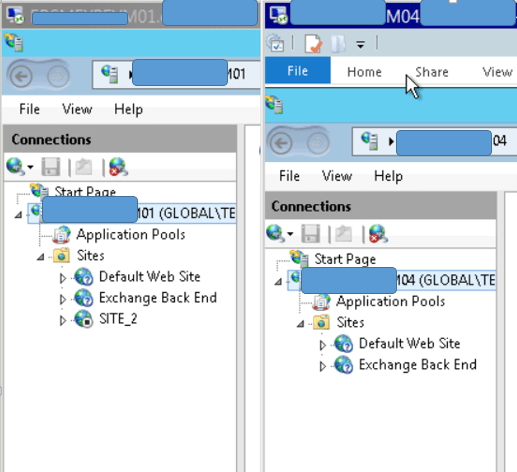
By examining the IIS I have remarked this configuration different The wrong server have a SITE_2 stopped.
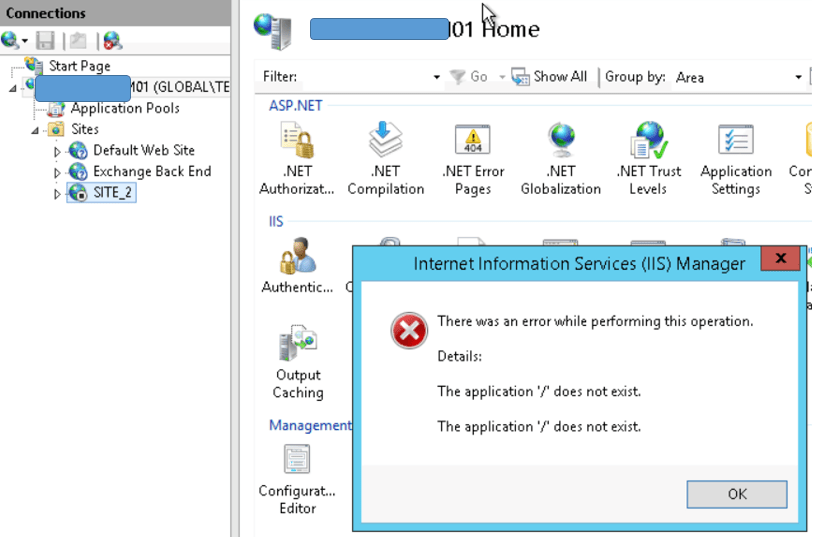
When I want to delete it
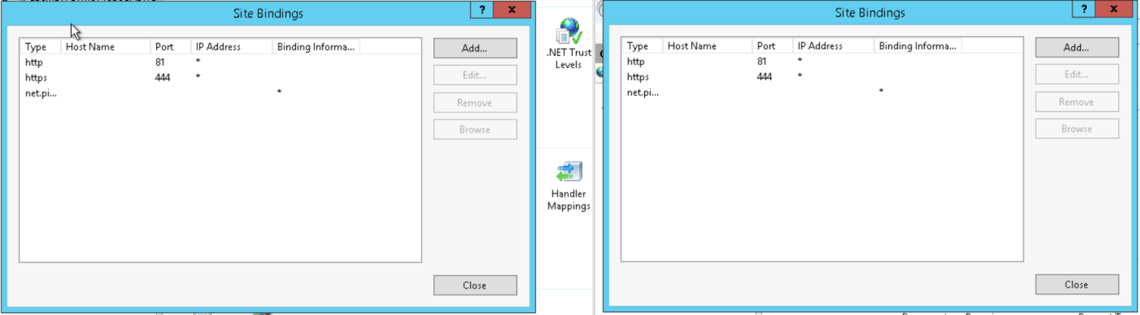
Binding for the default website are the same on left the wrong server on the right a functional server

Binding for the Backend website are the same……
Finally I find a way to delete this second site but I’ve got still the issue on server 01
As I said the Firewall is off but the service is running. Try to stop the service and try to connect with Exchange Managemnt Shell
Downloading wireshark pfouuuuuu…..
In the dialog I can see a kerberos error
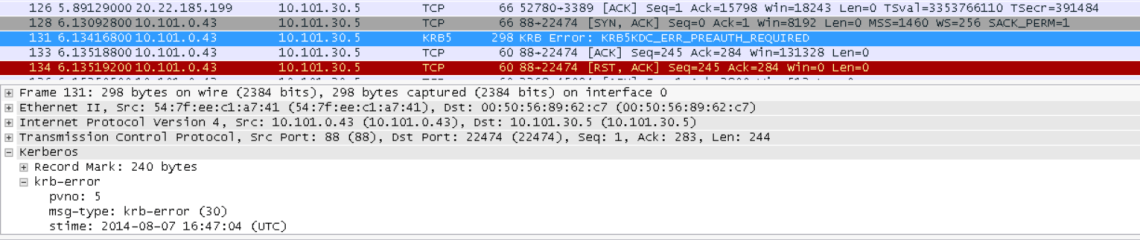
Let see in the event viewer on the server if we can find some relevant information.
Changing the Kerberos Log Level on the Server and reboot (http://support.microsoft.com/kb/262177)

And .. just after a simple reboot . Whaou !!

Let see what is inside
Log Name: System
Source: Microsoft-Windows-Security-Kerberos
Date: 8/8/2014 9:18:38 AM
Event ID: 3
Task Category: None
Level: Error
Keywords: Classic
User: N/A
Computer: AAABBBCCCS01.xx.yyy.loc
Description:
A Kerberos error message was received:
on logon session xx.yyy.loc\AAABBBCCCS01$
Client Time:
Server Time: 7:18:39.0000 8/8/2014 Z
Error Code: 0x19 KDC_ERR_PREAUTH_REQUIRED
Extended Error:
Client Realm:
Client Name:
Server Realm: xx.yyy.loc
Server Name: krbtgt/xx.yyy.loc
Target Name: krbtgt/xx.yyy.loc@xx.yyy.loc
Error Text:
Let see if I have the same behavior with other functional server. And I can observe that I ve the same even but the EMS works

I found a very interesting article about Kerberos error and especially KDC_ERR_PREAUTH_REQUIRED Issue last Night. http://blogs.technet.com/b/makeiteasy/archive/2013/01/14/kdc-err-preauth-required-vs-kdc-err-preauth-failed.aspx
I will forget the Kerberos Track because I can see any KDC_ERR_PREAUTH_FAILED in the Wireshark dialog or in the event log.. The issue should be more linked to Winrm EMS.
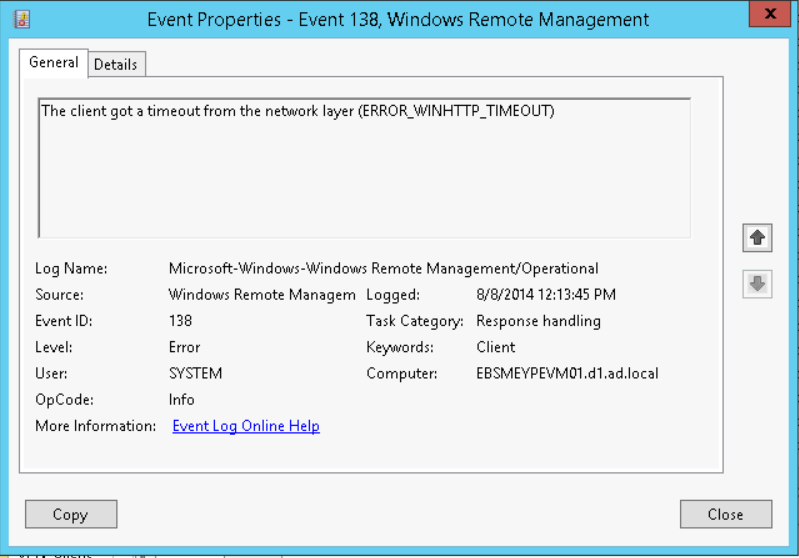
I get back to Windows remote Management and I observe this
 Travailler ensemble