



ISSUE DESCRIPTION
When I tried to move a user from Skype 2015 to Microsoft Teams with Move-csUser, the user mentioned in the CMD let is not found in AD

Now let see the User Sip Address

ENVIRONNEMENT
Skype On Prem version
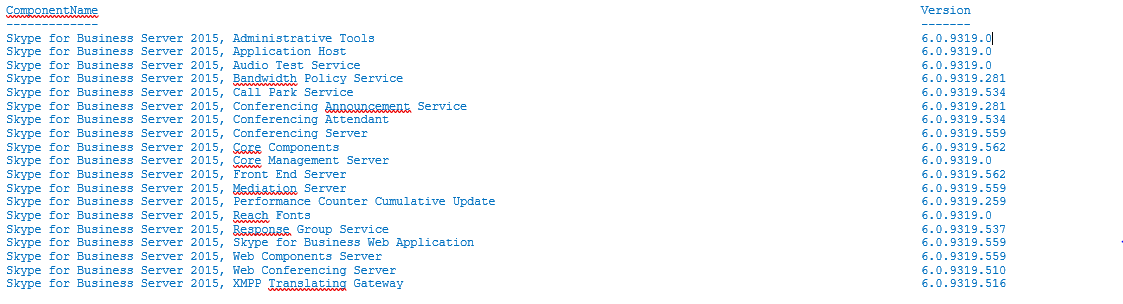
CAUSE
Following some Internet articles it could happens if the MsRTCSip properties is not sync into Azure AD Let See the configuration

The configuration looks correct
Here are the mandatory attribut to synchronize : https://docs.microsoft.com/en-us/azure/active-directory/hybrid/reference-connect-sync-attributes-synchronized
The User have a E5 Licence with Skype Online activated Plan 2
After checking the configuration of the user we found this
PS C:\Users\> Get-csonlineuser -identity User@lcompany.com | fl Interpretedusertype, hostingprovider
InterpretedUserType : HybridOnpremSfBUser
HostingProvider : SRV:
SOLUTION
We ask for the tenant information and identify the 2 characters after Lync : « DC=lync0e001,DC=local »
PS C:\Windows\system32> get-cstenant | ft identity
Identity
——–
OU=1uyt8076-709d-4b09-JKd9-648701411,OU=OCS Tenants,DC=lync0e001,DC=local
And we restqrt the migration with the correct URL
PS C:\Windows\system32> $url=https://admin0e.online.lync.com/HostedMigration/hostedmigrationService.svc
PS C:\Windows\system32> Move-CsUser -Identity user1@company.com -Target sipfed.online.lync.com -MoveToTeams -Credential $Mycreds -HostedMigrationOverrideUrl $url -Proxypool ….
And the user has been migrated to Teams !
 Travailler ensemble