


Table des matières
1 Solution 2 : Profile Sync 18
1.1.1 09;40 Arrêt de Azure AD Connect / Stopping Azure AD Connect 18
1.1.5 09:55 Synchronisation dans OKta (import incremental) 20
1.1.7 10h00 Vérification sur Office 365 et Azure AD / Audit on Office 365 and Azure AD 21
1.1.8 10 :03 : Exécution de Azure AD Connect / Running Azure AD Connect 23
1.1.9 10 :07 retour dans Azure AD / back to Azure AD 24
1.1.10 10 : 15 Vérification dans Exchange online / Verification in Exchange online 25
1.2.2 12 :02 : Lancement du cycle Azure AD connect / Launching the Azure AD connect cycle 27
1.2.3 12 :04 : Synchronisation dans Okta / Synchronization in Okta 28

This Blog in PDF Format here : https://1drv.ms/b/s!AlKfEdbwpIS_iPs3cKFsf9rnbiwqHQ?e=FUBCEQ
Dans le cadre d’une hybridation Exchange, la gestion des identités hybride n’est pas supportée par OKta. Ce dernier impose donc l’implantation d’un environnement Azure AD Connect en complément de ses fonctions d’IDP et de provisioning.
La problématique rencontrée est donc de trouver la meilleure adéquation entre, le fonctionnement de OKTA qui encore une fois, assurera dans notre modèle l’authentification (IDP) et le provisionnement des licences et Azure AD connect qui aura en charge de gérer les identités Hybrides des environnements Exchange On prem et Exchange online.
In the context of Exchange hybridization, hybrid identity management is not supported by OKta. It therefore requires the implementation of an Azure AD Connect environment in addition to its IDP and provisioning functions.
The problem we encountered is to find the best match between OKTA, which once again, in our model, will provide authentication (IDP) and license provisioning, and Azure AD Connect, which will be responsible for managing hybrid identities in the Exchange On prem and Exchange online environments.
Solution 1 : Licences / Roles Management Only
La première solution que nous avons testée est de laisser Azure AD connect créer dans Azure AD le compte On premise à synchroniser (on parle ici d’un compte Utilisateur local avec une boites aux lettre Exchange onpremise, puis laissez OKta provisionner la licence dans Office 365.
De ce fait on optera pour cette configuration dans Okta
The first solution we tested is to let Azure AD connect create the On premise account to synchronize (we are talking about a local user account with an Exchange on premise mailbox), then let OKta provision the license in Office 365.
Therefore we will choose this configuration in Okta
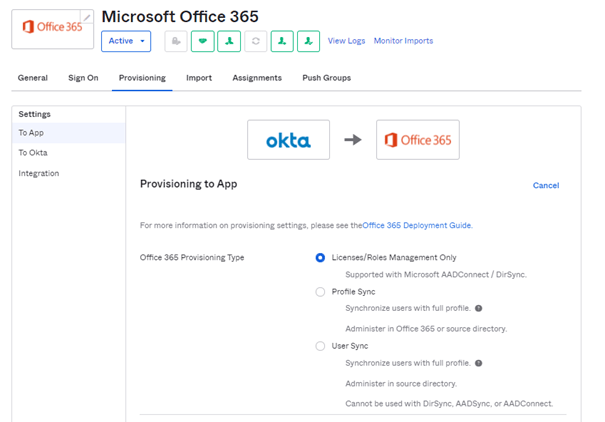
Le majeur problème de cette configuration est qu’il est possible qu’OKTA essaye d’affecter une licence sur un compte qu’Azure AD connect n’a pas encore répliqué. Si cela est le cas il faudra avec OKTA traiter cette erreur et relancer l’affectation de la licence.
The main problem with this configuration is that OKTA may try to assign a license to an account that Azure AD connect has not yet replicated. If this is the case, OKTA will have to deal with this error and restart the license assignment.
Solution 2 : Profile Sync
Dans ce scénario, OKta va créer directement l’utilisateur grâce au mode Profile Sync et create User.
In this scenario, OKta will create the user directly thanks to the Profile Sync mode and create User.
Test 1 : Okta First
09;40 Arrêt de Azure AD Connect / Stopping Azure AD Connect
09 :45 Changement de la configuration OKta en Profile Sync et Create User / Change OKta configuration to Profile Sync and Create User
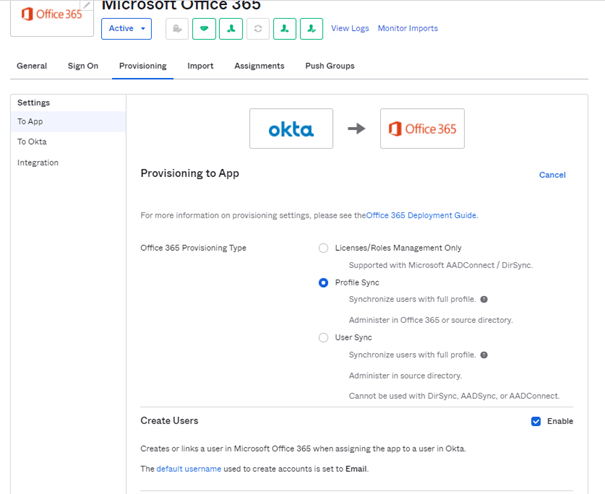
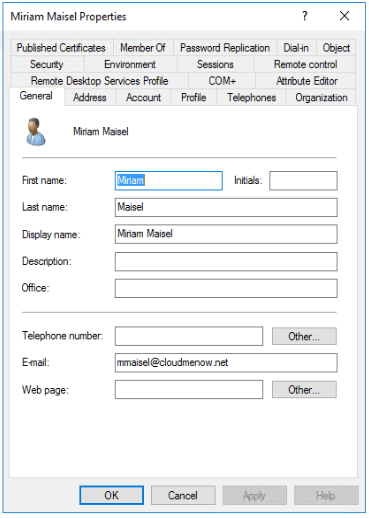
09:45 Création de l’utilisateur Miriam Maisel (MMaisel@cloudmenow.net) / User creation Miriam Maisel (MMaisel@cloudmenow.net)
09 :50 Création d’une boite aux lettre locale pour Miss Maisel (Primary Smtp Address = Mmaisel@cloudmenow.net=) / Creation of a local mailbox for Miss Maisel (Primary Smtp Address = Mmaisel@cloudmenow.net=)
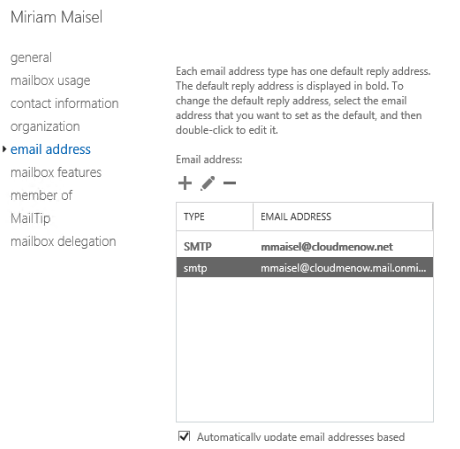
On notera la présence de la proxy Address cloudmenow.mail.onmicrosoft du a l’hybridation.
Note the presence of the proxy address cloudmenow.mail.onmicrosoft due to hybridization.
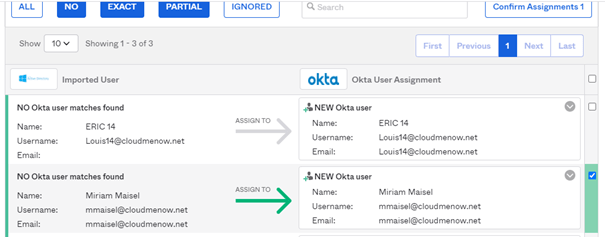
09:55 Synchronisation dans OKta (import incremental)
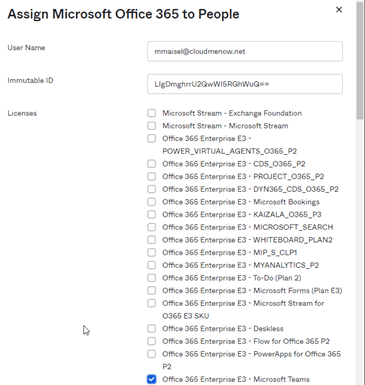
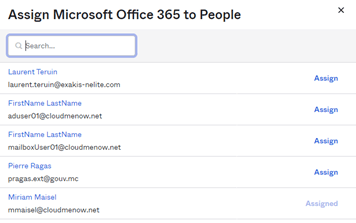
10H 00 Assignation depuis OKta de l’application Office 365 avec licence Teams (Pas de Licence Exchange Online) / Assignment from OKta of the Office 365 application with Teams license (No Exchange Online license)
10h00 Vérification sur Office 365 et Azure AD / Audit on Office 365 and Azure AD
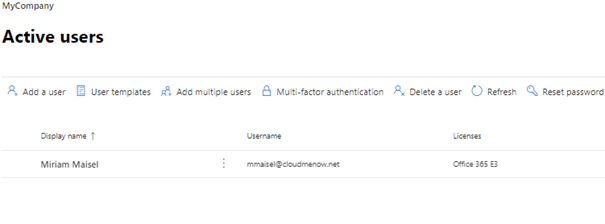
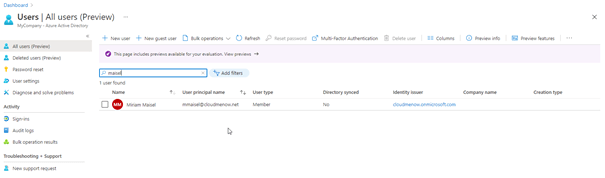
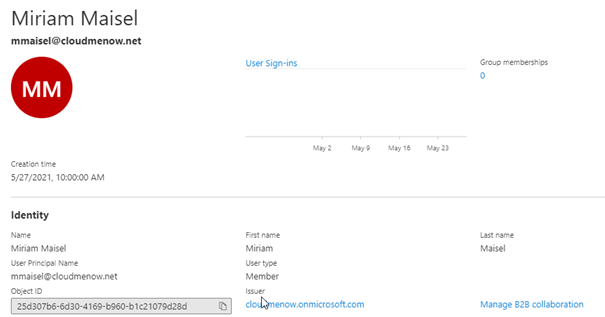
L’utilisateur (25d307b6-6d30-4169-b960-b1c21079d28d) n’est pas marqué comme étant synchronisé / User (25d307b6-6d30-4169-b960-b1c21079d28d) is not marked as synchronized
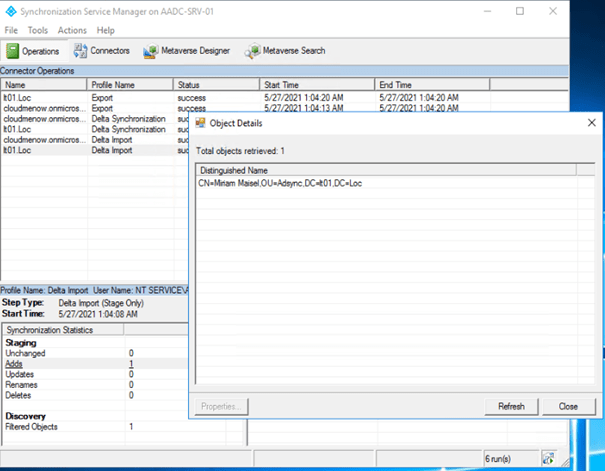
10 :03 : Exécution de Azure AD Connect / Running Azure AD Connect
Azure AD Connect l’ajoute / Azure AD Connect add the user
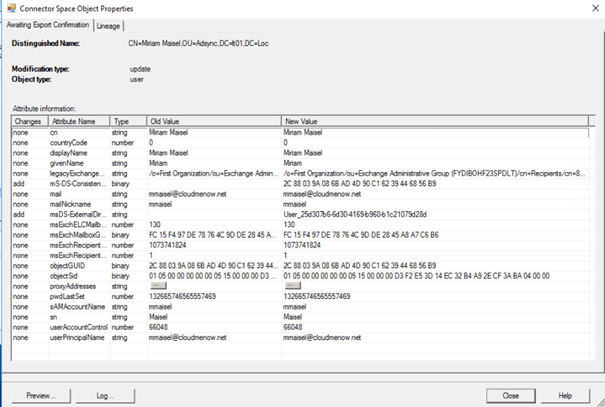
10 :07 retour dans Azure AD / back to Azure AD
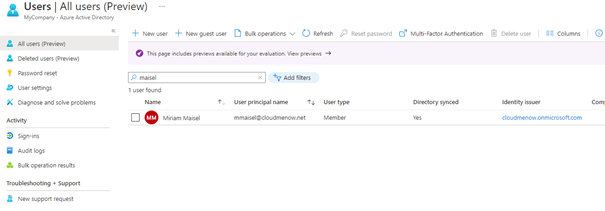
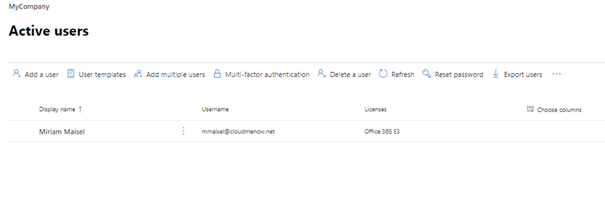
L’utilisateur est synchronisé ;-). Et dans Office 365 il est toujours présent avec sa licence (normal)
The user is synchronized ;-). And in Office 365 it is always present with its license (normal)
10 : 15 Vérification dans Exchange online / Verification in Exchange online

La boite aux lettre onprem de Miriam Maisel est représentée par un mailuser dans Exchange Online ce qui est plutôt correct.
Miriam Maisel’s onprem mailbox is represented by a mailuser in Exchange Online which is quite correct
Test 2 : Azure AD connect passe en premier et créer l’utilisateur / Azure AD connect comes first and create the user
11 :56 création de l’utilisateur Rachel Brosnahan dans l’AD local / creation of the user Rachel Brosnahan in the local AD

12 :00 création d’une boite aux lettres locale pour Rachel Brosnahan / creation of a local mailbox for
Rachel Brosnahan

12 :02 : Lancement du cycle Azure AD connect / Launching the Azure AD connect cycle

12 :02 Vérification dans l’Azure AD

Le compte est synchronisé . Et dans Office 365 le compte est présent mais aucune licence affectée. (ce qui est normal)
The account is synchronized. And in Office 365 the account is present but no license assigned. (which is normal)

12 :04 : Synchronisation dans Okta / Synchronization in Okta
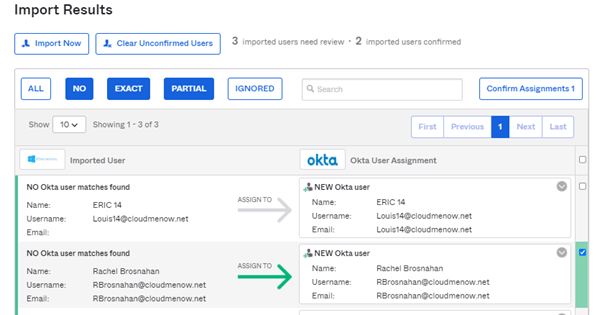
Assignation de l’utilisateur dans dans Okta / User assignment in Okta
12 :06 Positionnement de la licence O365 Teams pour l’utilisateur / Positioning the O365 Teams license for the user
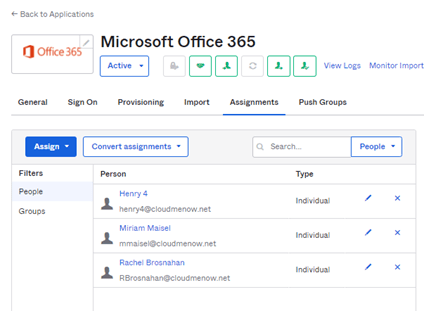
Le compte existant déjà, OKTA aurait pu générer une erreur mais aucune erreur n’est remontée dans le portail. Ce qui est plutôt satisfaisant.
Since the account already exists, OKTA could have generated an error, but no error was found in the portal. This is quite satisfactory.
12 :07 vérification dans Azure AD et Exchange online / verification in Azure AD and Exchange online

Le compte reste de type synchronisé. The account remains synchronized
12 :10 la licence n’est pas encore positionnée. / 12:10 the license is not yet positioned.
12 :22 la licence n’est toujours pas positionnée / 12:22 the license is still not positioned

Vérification de l’assignation dans l’application OKTA / Verification of the assignment in the OKTA application
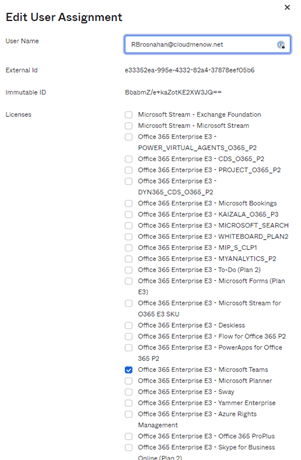
13 :27 PM : la licence n’est pas encore positionnée. / 13 :27 the license is not yet positioned
Aucune Tache à résoudre n’est présente dans OKta ;-(
No tasks to solve are present in OKta ;-(
Dans le cadre d’une hybridation Exchange, la gestion des identités hybride n’est pas supportée par OKta. Ce dernier impose donc l’implantation d’un environnement Azure AD Connect en complément de ses fonctions d’IDP et de provisioning.
La problématique rencontrée est donc de trouver la meilleure adéquation entre, le fonctionnement de OKTA qui encore une fois, assurera dans notre modèle l’authentification (IDP) et le provisionnement des licences et Azure AD connect qui aura en charge de gérer les identités Hybrides des environnements Exchange On prem et Exchange online.
In the context of Exchange hybridization, hybrid identity management is not supported by OKta. It therefore requires the implementation of an Azure AD Connect environment in addition to its IDP and provisioning functions. The problem we encountered is to find the best match between OKTA, which once again, in our model, will provide authentication (IDP) and license provisioning, and Azure AD Connect, which will be responsible for managing hybrid identities in the Exchange On prem and Exchange online environments.
Solution 1 : Licences / Roles Management Only
La première solution que nous avons testée est de laisser Azure AD connect créer dans Azure AD le compte On premise à synchroniser (on parle ici d’un compte Utilisateur local avec une boites aux lettre Exchange onpremise, puis laissez OKta provisionner la licence dans Office 365.
De ce fait on optera pour cette configuration dans Okta
The first solution we tested is to let Azure AD connect create the On premise account to synchronize (we are talking about a local user account with an Exchange on premise mailbox), then let OKta provision the license in Office 365.
Therefore we will choose this configuration in Okta
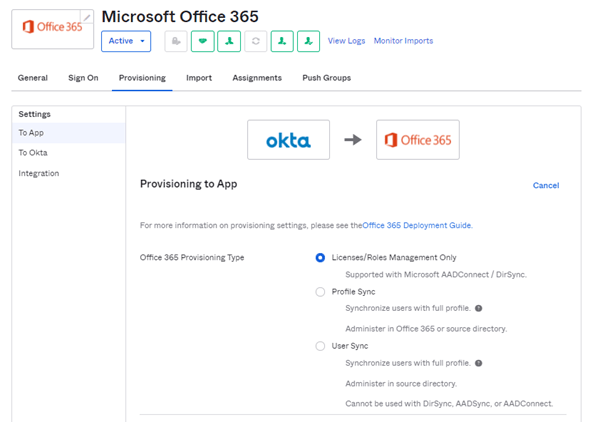
Le majeur problème de cette configuration est qu’il est possible qu’OKTA essaye d’affecter une licence sur un compte qu’Azure AD connect n’a pas encore répliqué. Si cela est le cas il faudra avec OKTA traiter cette erreur et relancer l’affectation de la licence.
The main problem with this configuration is that OKTA may try to assign a license to an account that Azure AD connect has not yet replicated. If this is the case, OKTA will have to deal with this error and restart the license assignment.
-
Solution 2 : Profile Sync
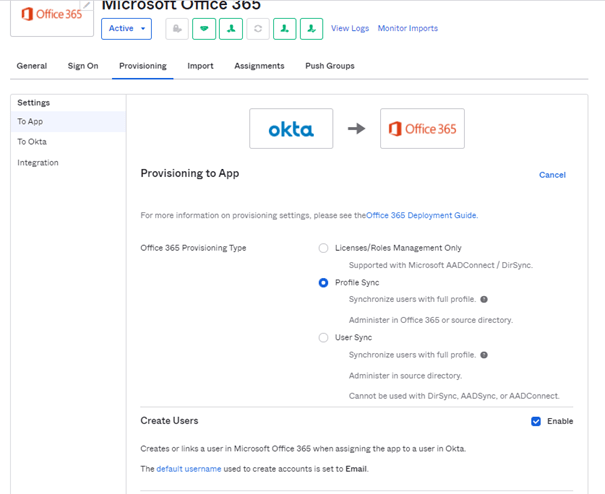
Dans ce scénario, OKta va créer directement l’utilisateur grâce au mode Profile Sync et create User.
In this scenario, OKta will create the user directly thanks to the Profile Sync mode and create User.
-
Test 1 : Okta First
-
09;40 Arrêt de Azure AD Connect / Stopping Azure AD Connect
-
09 :45 Changement de la configuration OKta en Profile Sync et Create User / Change OKta configuration to Profile Sync and Create User
-
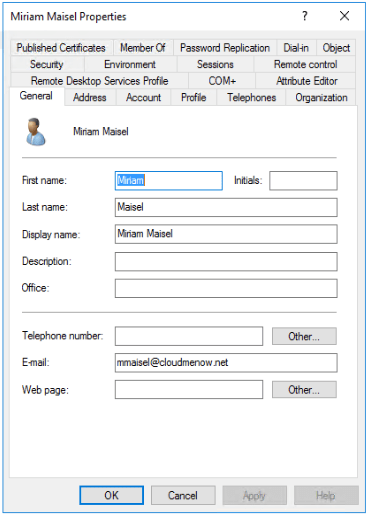
09:45 Création de l’utilisateur Miriam Maisel (MMaisel@cloudmenow.net) / User creation Miriam Maisel (MMaisel@cloudmenow.net)
-
09 :50 Création d’une boite aux lettre locale pour Miss Maisel (Primary Smtp Address = Mmaisel@cloudmenow.net=) / Creation of a local mailbox for Miss Maisel (Primary Smtp Address = Mmaisel@cloudmenow.net=)
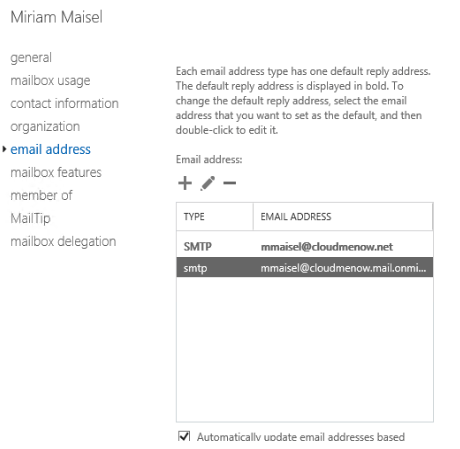
On notera la présence de la proxy Address cloudmenow.mail.onmicrosoft du a l’hybridation.
Note the presence of the proxy address cloudmenow.mail.onmicrosoft due to hybridization.
-
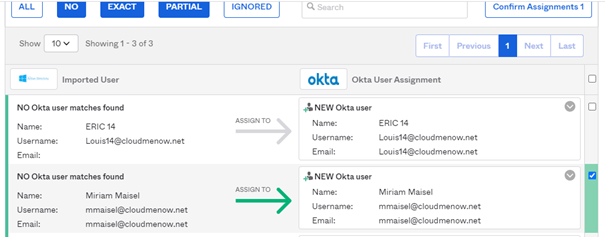
09:55 Synchronisation dans OKta (import incremental)
-
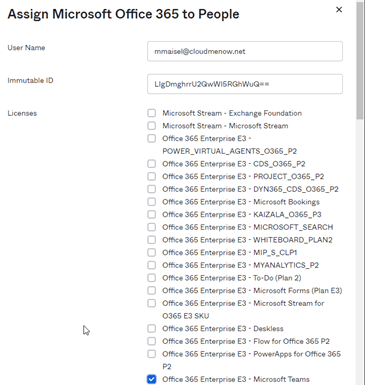
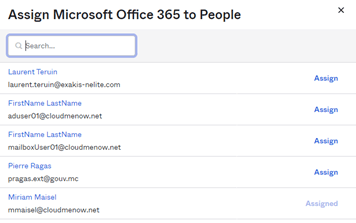
10H 00 Assignation depuis OKta de l’application Office 365 avec licence Teams (Pas de Licence Exchange Online) / Assignment from OKta of the Office 365 application with Teams license (No Exchange Online license)
-
10h00 Vérification sur Office 365 et Azure AD / Audit on Office 365 and Azure AD
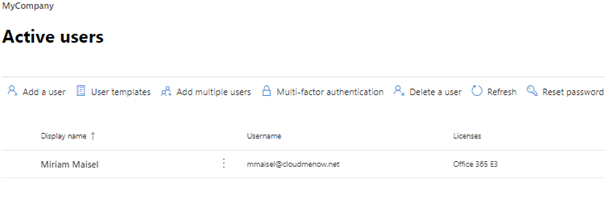
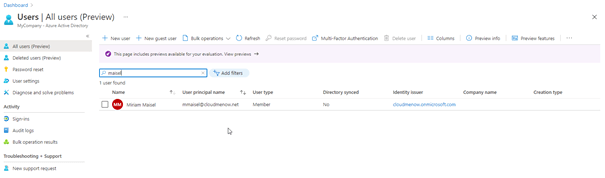
L’utilisateur (25d307b6-6d30-4169-b960-b1c21079d28d) n’est pas marqué comme étant synchronisé / User (25d307b6-6d30-4169-b960-b1c21079d28d) is not marked as synchronized

-
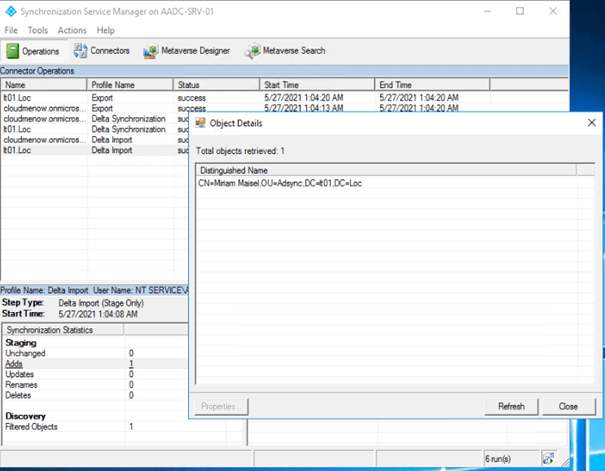
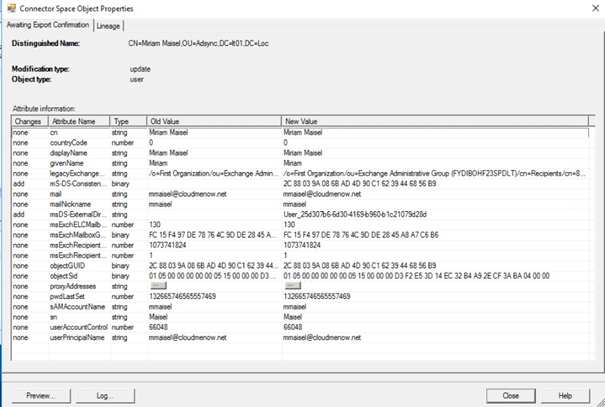
10 :03 : Exécution de Azure AD Connect / Running Azure AD Connect
Azure AD Connect l’ajoute / Azure AD Connect add the user
-
10 :07 retour dans Azure AD / back to Azure AD

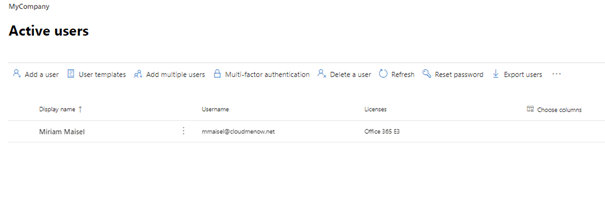
L’utilisateur est synchronisé ;-). Et dans Office 365 il est toujours présent avec sa licence (normal)
The user is synchronized ;-). And in Office 365 it is always present with its license (normal)
-
10 : 15 Vérification dans Exchange online / Verification in Exchange online

La boite aux lettre onprem de Miriam Maisel est représentée par un mailuser dans Exchange Online ce qui est plutôt correct.
Miriam Maisel’s onprem mailbox is represented by a mailuser in Exchange Online which is quite correct
-
Test 2: Azure AD connect passe en premier et créer l’utilisateur / Azure AD connect comes first and create the user
-
11 :56 création de l’utilisateur Rachel Brosnahan dans l’AD local / creation of the user Rachel Brosnahan in the local AD
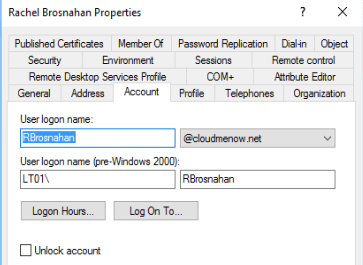
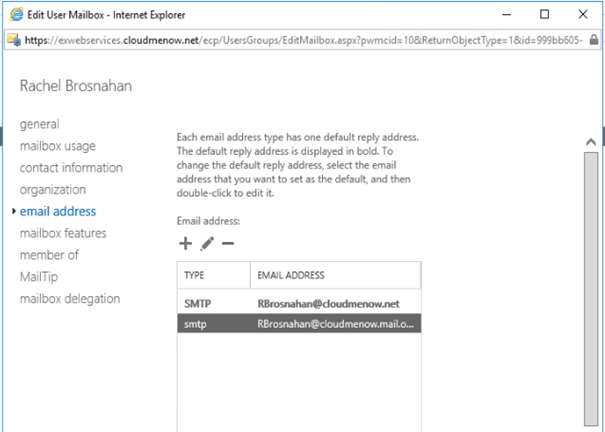
12 :00 création d’une boite aux lettres locale pour Rachel Brosnahan / creation of a local mailbox for
Rachel Brosnahan
-
12 :02 : Lancement du cycle Azure AD connect / Launching the Azure AD connect cycle

12 :02 Vérification dans l’Azure AD

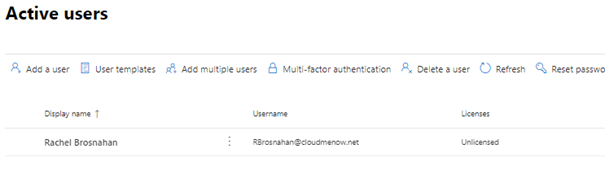
Le compte est synchronisé . Et dans Office 365 le compte est présent mais aucune licence affectée. (ce qui est normal)
The account is synchronized. And in Office 365 the account is present but no license assigned. (which is normal)
-
12 :04 : Synchronisation dans Okta / Synchronization in Okta
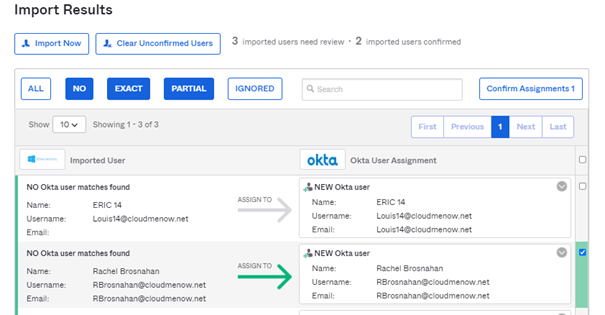
Assignation de l’utilisateur dans dans Okta / User assignment in Okta
12 :06 Positionnement de la licence O365 Teams pour l’utilisateur / Positioning the O365 Teams license for the user
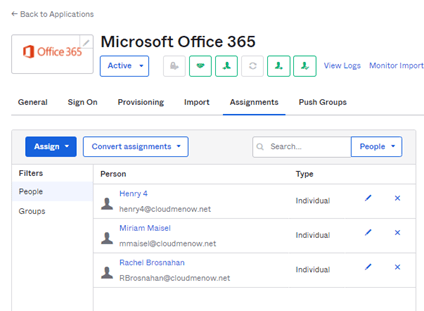
Le compte existant déjà, OKTA aurait pu générer une erreur mais aucune erreur n’est remontée dans le portail. Ce qui est plutôt satisfaisant.
Since the account already exists, OKTA could have generated an error, but no error was found in the portal. This is quite satisfactory.
-
12 :07 vérification dans Azure AD et Exchange online / verification in Azure AD and Exchange online

Le compte reste de type synchronisé. The account remains synchronized
12 :10 la licence n’est pas encore positionnée. / 12:10 the license is not yet positioned.
12 :22 la licence n’est toujours pas positionnée / 12:22 the license is still not positioned

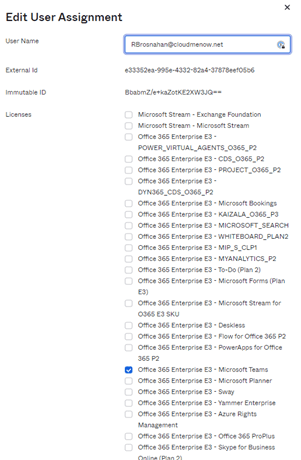
Vérification de l’assignation dans l’application OKTA / Verification of the assignment in the OKTA application
-
13 :27 PM : la licence n’est pas encore positionnée. / 13 :27 the license is not yet positioned
Aucune Tache à résoudre n’est présente dans OKta ;-(
No tasks to solve are present in OKta ;-(
 Travailler ensemble