

We are currently testing the coexistence between the Exchange 2019 CU14 environment we’ve installed and our old Exchange 2016 environment. We need to migrate the client access currently carried by Exchange 2016 to Exchange 2019.
In Owa, the Exchange 2019 client access service ported by the vip Outlook.mycompany.com correctly provides OWA services for mailboxes on Exchange 2016 servers.
On the other hand, when you try to connect an Outlook client to the Exchange 2019 VIP, the user is prompted by an authentication window which repeatedly asks the user to authenticate
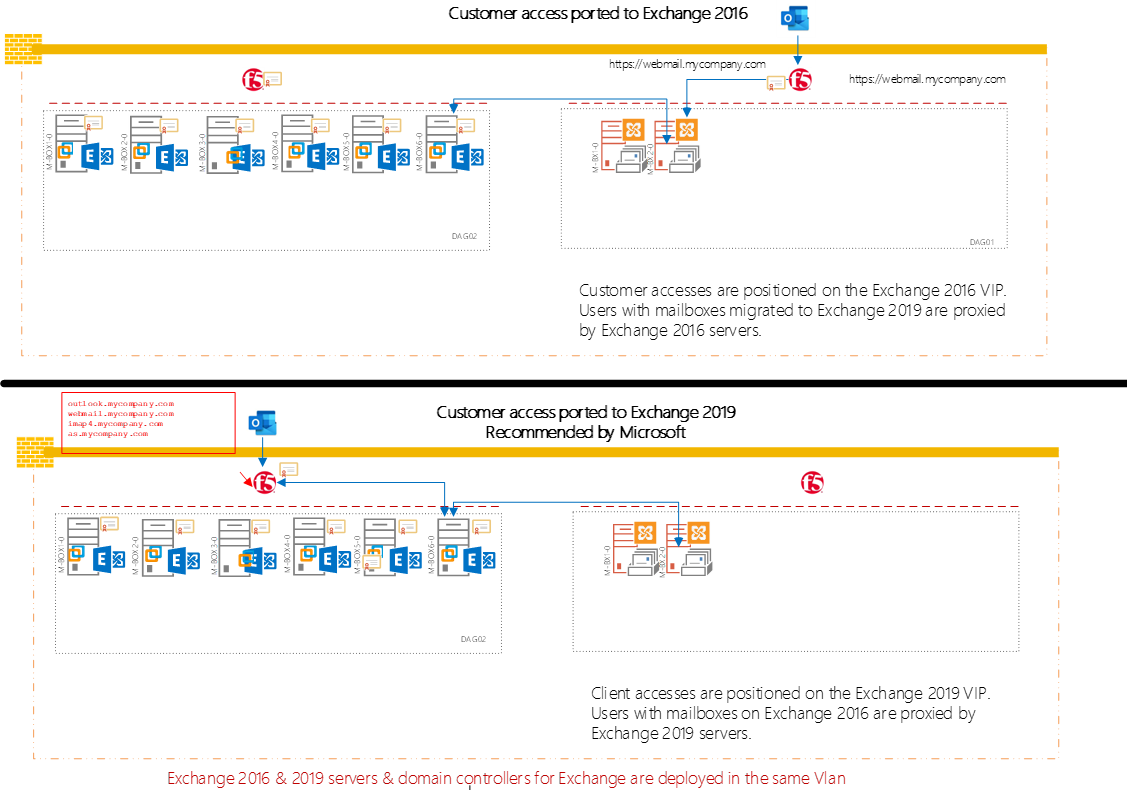
The configuration is this one
Note :
- Exchange 2019 server names are MBOX-x and Exchange 2016 Mbx-x
- All exchange servers are running in the same vlan and not firewall are present in between
- Outlook client could not connect directly to a Exchange server. The only way is to use F5 VIP
- To simplify the troubleshooting , the F5 VIP Exchange 2019 load balance only one Exchange 2019 server: Mbox1-0
- Webmail.mycompany.com is the Outlook connection point. This address point today to the Exchange 2016 vip address.
- Extended protection has not been set voluntary.
- Exchange Emergency Mitigation Service has Disabled on org level voluntary
- A common work with network analyst show that Outlook client authentication request (that have its Mailbox on Exchange 2016) goes to the Exchange 2019 Vip for authentication, but this one despite the correct credential fails.
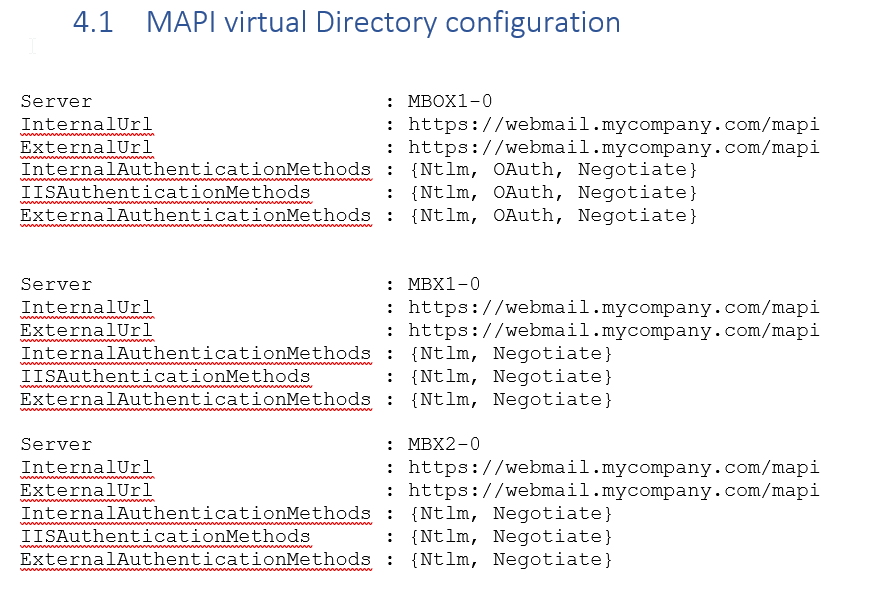
on the Exchange MAPI logs we can see this
I see the Outllook request but the authentication protocol used is Oauth which it not enabled on the Mapi virtual directory. Same behavior and same error when the Oauth authentication method was present in the MAPI virtual Directory of the Exchange 2019 server MBOX1-0
Line 40: 2024-08-06T14:06:33.589Z,f8fcf362-8f93-4ad0-9c0d-84ebe6956da9,15,2,1544,11,{4611697D-50EA-46BD-8E6A-45B89D8E02E5},Mapi,webmail.mycompany.com,/mapi/emsmdb/,,Bearer,false,,,,Microsoft Office/16.0 (Windows NT 10.0; Microsoft Outlook 16.0.16731; Pro),172.16.30.156,MBOX1-0,401,,,POST,,,,,,,,,343,,,,,,,,,,,,,,,34,,,,,,,,,,,,,,34,,34,34,,?MailboxId=a2d9b460-6c5e-4e66-a363-fa7b97f3bc@mycompany.com,,BeginRequest=2024-08-06T14:06:33.555Z;CorrelationID=;SharedCacheGuard=0;EndRequest=2024-08-06T14:06:33.589Z;S:ServiceLatencyMetadata.AuthModuleLatency=33;’S:ServiceCommonMetadata.OAuthError=Flighting is not enabled for domain »vperson@mycompany.com ».’;S:ServiceCommonMetadata.OAuthErrorCategory=OAuthNotAvailable;I32:ATE.C[INF1-AD1-2.mycompany.com]=2;F:ATE.AL[INF1-AD1-2.mycompany.com]=0;I32:ADS.C[INF1-AD1-2]=1;F:ADS.AL[INF1-AD1-2]=0.7492;I32:ADR.C[INF1-AD1-2]=1;F:ADR.AL[INF1-AD1-2]=1.0741,,,,,,
FYI : The Oauth is disabled at the organization level.
C:\Windows\system32>Get-OrganizationConfig | fl auth
ActivityBasedAuthenticationTimeoutEnabled : True
ActivityBasedAuthenticationTimeoutInterval : 06:00:00
ActivityBasedAuthenticationTimeoutWithSingleSignOnEnabled : True
AVAuthenticationService :
OAuth2ClientProfileEnabled : False
AdfsAuthenticationConfiguration :
EnableAuthAdminReadSession : True
DefaultAuthenticationPolicy : OrgWideDefault
 Travailler ensemble
wow!! 53Les personnes dans Microsoft Viva
J’aimeJ’aime